
Using proxies in Firefox is easy if you know those steps.
Here are the steps on How to Use proxy in firefox
First, you need to Open Firefox and then go to the right site you See  Open Menu and then Click Option.
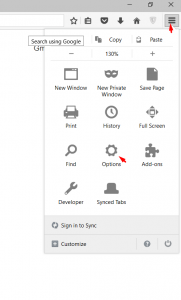
After Click Option, you will direct yo Preference page.Now you need to click Advance Tab in left sidebar than Network and then Settings.
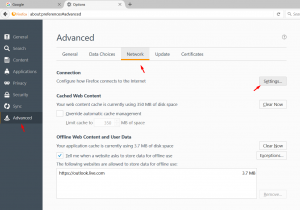
After Clicking in Setting you will see Connection Setting Tab.
Here you need to Check Manual proxy Configuration box and then insert IP address in HTTP Proxy field and insert Port in it field.
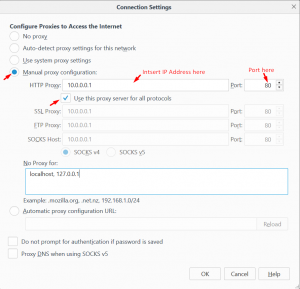
After inserting the proxy Check box Use proxy server for all protocol and then clicking Ok.
If you are using Proxies from Proxy-hub after doing that it will ask insert proxy Username and Password.

Because it is Private Proxy which only you will use and if you want it will not ask again you can IP authenticate then it will not ask.
IP authentication is available in proxy-hub.com.
[…] Configuring google chrome on how to use proxies server.it’s a piece a cake like using proxy in Firefox. […]